Send the strongest original logo artwork you have, together with a layout reference showing the finished mat dimensions, the printed logo size, its position and the direction from which it should be read. Then ask the supplier to confirm which files it accepts and whether the artwork has enough detail at the intended printed size.
Keep the original artwork and the layout reference separate. This lets you explain how the finished mat should look without stretching or otherwise changing the logo to fit.
Start with the original logo artwork
If your business has original vector artwork, start there. Vector graphics describe shapes using mathematical lines and curves, so their vector edges remain sharp when scaled. Raster artwork is made of pixels; enlarging it can make those pixels visible or reduce apparent sharpness. Adobe explains the difference between raster and vector graphics.
If a raster image is the only artwork available, send the strongest original version you have and state the intended logo size. The supplier needs to assess that source against the chosen product before you commit to an order.
A PDF filename does not establish that a logo is vector artwork. A PDF can hold vector graphics, raster images or both. Putting a small picture into a PDF may leave the logo as the same small picture inside a different file. Adobe’s file guidance covers these distinctions.
Use artwork your business is permitted to reproduce, and retain the original file so later layout changes can be traced to a clear source.
Assess detail at the size of the printed logo
The finished mat size and the printed logo size are separate measurements. A logo may occupy only part of a large mat, so the artwork needs to be assessed at the width and height it will actually have on the textile.
For a raster image with unchanged pixel dimensions, increasing its physical print size reduces its pixel density. For example, enlarging a logo from 20 cm wide to 40 cm wide gives it half as many pixels per centimetre. That illustrates the relationship between size and detail; it is not a required resolution for mat printing.
Increasing the pixel count through upsampling cannot restore original detail that was absent from the source. Adobe’s image-size and resampling guidance explains why. Ask the supplier to confirm file types and resolution requirements for the chosen textile and logo size.
Show how the logo should sit on the mat
A simple layout reference can communicate position, proportions, the blank border and viewing direction. It does not need to alter the original logo.
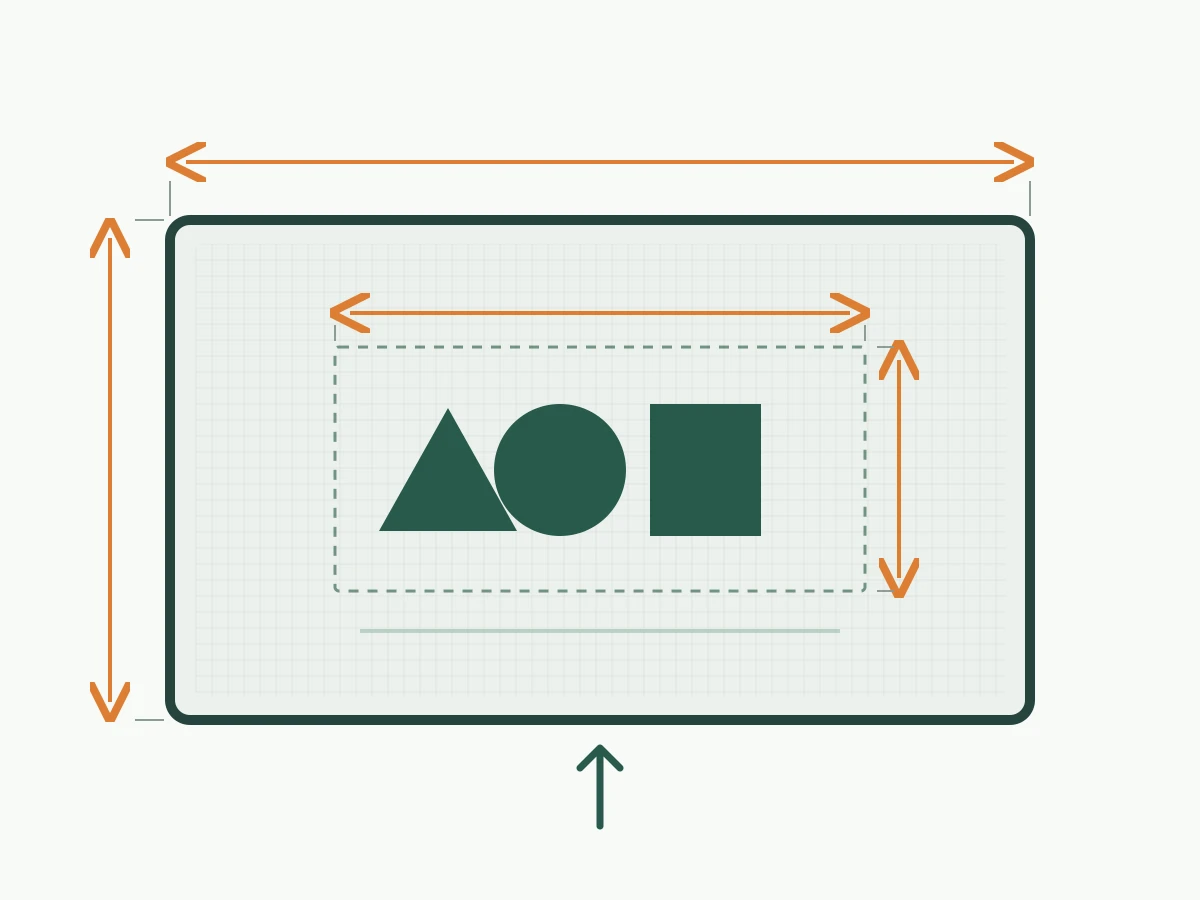
Give both finished mat dimensions with their units. State the intended logo width and height separately, show its position and requested blank border, and mark the side from which it should appear upright.
Preserve the logo’s proportions. If it leaves more blank space than you expected, discuss a different size or position instead of stretching it to fill the mat. Treat the border shown in your reference as a requested layout, subject to confirmation of the product’s usable print area.
When requesting a change, identify the layout version you want revised. Keep one selected version for approval so two conflicting arrangements do not both appear to be final.
Confirm what the chosen textile can reproduce
Before treating the layout as ready for production, ask about accepted file types, how fonts and linked images should be supplied, the usable print area and any limits on small details. These points need to be agreed for the particular product.
Record the intended colours and any existing brand colour reference. Then agree how the result will be assessed on the chosen textile. A digital layout can show the intended arrangement, but it cannot verify the physical texture or finished colour appearance.
Also confirm the proof process and any sampling arrangements: what you will receive, what it allows you to assess and which version you will be approving. File preparation, colours and proof approval should all refer to the same finished specification.
Send an enquiry with the layout details
Custom Carpet Maker accepts business enquiries about custom sizes, designs including logos, composition, construction and backing. The particular combination must be confirmed for the order. Its starting business order quantity is 100 m², and it supplies separate rugs and textile door mats; the range does not cover every commercial entrance-mat construction.
The custom order information asks buyers to describe their artwork or logo in the enquiry. The supplier will explain how to send it.
Your next step is to send your artwork enquiry with the product and intended use location, finished mat size, original artwork available, requested logo dimensions and orientation, quantities for each variation and destination. Ask for confirmation of file suitability and the proof process before committing to the order.